%20(1).jpg)
Marketing teams rely on GA4 to understand how users behave on the website, and on Salesforce to track what happens after a lead converts. When those two systems stay siloed, you see campaign traffic in one tool and pipeline results in another, with no reliable way to connect cause and effect.
That gap creates a familiar reporting problem. GA4 can show which campaigns brought users to the site, which pages they viewed, and which events they triggered. Salesforce can show which leads became opportunities, which opportunities moved through the pipeline, and which campaigns influenced revenue. But unless the data is connected, marketing teams are left comparing screenshots, exports, and manually built reports.
Salesforce Marketing Intelligence, part of CRM Analytics, helps close that gap with a native GA4 connector. It brings behavioral web analytics into the same reporting environment as CRM data, making it easier to connect website activity with leads, opportunities, revenue, and customer outcomes.
This guide walks through how to set up the GA4 connector, choose the right virtual objects, work around GA4 data limits, validate the connection, and avoid the mistakes most teams hit during the first setup.
Why This Integration Matters
The main value of connecting GA4 with Salesforce Marketing Intelligence is not just convenience. It gives marketing and RevOps teams a clearer view of what happens before and after conversion.
- Full-Funnel Visibility: Link GA4’s event-based web analytics with Salesforce data for better understanding of marketing effectiveness and revenue impact.
- Automated Insights: Bring GA4 data directly into CRM Analytics for dashboards, AI-powered insights, and reporting without manual exports.
- Informed Marketing Optimization: Track which campaigns drive quality leads and revenue, not just form submissions
Before You Start: Prerequisites
Before setting up the GA4 connector, confirm you have the following in place. Skipping this step is the most common reason integrations fail halfway through setup.
- A Salesforce edition with CRM Analytics or Marketing Intelligence enabled. If you're not sure, check Setup → Company Information → User Licenses, or review Salesforce’s documentation on CRM Analytics licenses and permission sets.
- Admin-level access to both systems. You'll need permission to authorize OAuth connections in Salesforce and to read data from your GA4 property; Google explains it in its GA4 Property ID documentation. Have it ready — you'll paste it in Step 1.
- Your GA4 Property ID. This is a 9-digit number found in GA4 → Admin → Property Settings. Have it ready — you'll paste it in Step 1.
- A clear idea of which GA4 data you want in Salesforce. Virtual Objects have limits (covered in Step 3), so deciding upfront saves rework.
- For datasets over 1 million rows: access to a Google BigQuery project linked to your GA4 property. The native connector has row limits; larger pulls require the BigQuery bridge.
Step-by-Step Integration Guide
1. Set Up a GA4 Connector in Marketing Intelligence
- Go to Marketing Intelligence → Data Management and click “New Pipeline”.
- Select Google Analytics, and proceed.
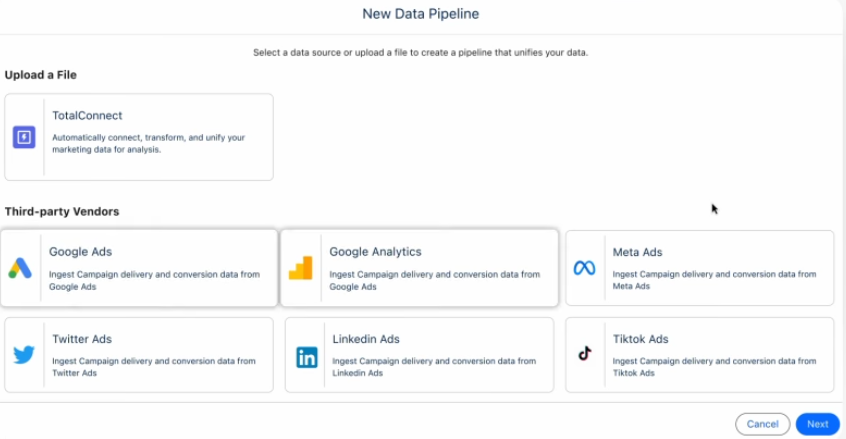
- Fill in the GA Property ID, data space
2. Authenticate and Configure Connection Details
- Assign a Connection Name - this appears in your pipeline list, so use something specific like
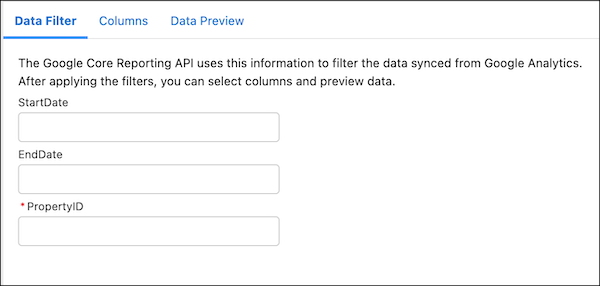
GA4_EU_Propertiesrather thanGA4_Connection_1. - Enter the GA4 Property ID - same 9-digit number from Step 1, Salesforce uses it to scope the connection.
- Configure Data Filters - this is where most teams under-invest. You can filter by date range, event name, or dimension value. For example, filter out internal traffic by excluding a specific
session_source, or limit the pull to events tied to campaigns you actually run.
3. Select Virtual Objects and Synchronize Data
GA4 data is modeled in CRM Analytics as virtual objects pre-structured datasets that represent GA4 concepts like sessions, events, users, and traffic sources. Instead of writing queries, you select which virtual objects to bring in, and Salesforce handles the mapping.
Common virtual objects and when to use them:
- Sessions - overall site engagement, bounce patterns, session duration
- Events - specific actions (form submits, clicks, purchases)
- Users - new vs returning behavior, user-level metrics
- Traffic sources - attribution across channels and campaigns
Mind the limits:
- Maximum 9 dimensions per object. If you try to include more (say, session source, medium, campaign, landing page, device, country, user type, browser, and OS), the pipeline will fail validation. Pick the nine that actually drive decisions.
- Maximum 1 million rows per object. For high-traffic sites, you'll hit this ceiling fast - especially on events. Once you're close, the native connector stops being practical.
When to switch to BigQuery: if any single virtual object regularly exceeds 1M rows, or you need raw event-level data for custom modeling, move to the GA4 BigQuery Export and ingest from BigQuery into CRM Analytics instead. It's more setup, but removes the row ceiling.
4. Validate and Run the Connection
Once virtual objects are selected, click Save & Test. This validates three things at once: OAuth credentials are still valid, the GA4 Property ID resolves, and the selected dimensions fit within GA4's API quotas.
If validation passes, you have two choices for running the sync:
- Manual run - useful for the first pull, so you can inspect the data before committing to a schedule.
- Scheduled sync - the real operational setup. For live marketing dashboards, hourly syncs keep data fresh. For weekly reporting, daily is usually enough and gentler on API quotas.
Best Practices & Tips
Summary
Integrating GA4 with Salesforce Marketing Intelligence gives marketing and RevOps teams a single reporting layer for website behavior and CRM outcomes. Instead of comparing GA4 traffic reports with Salesforce pipeline dashboards manually, teams can analyze campaign performance, web engagement, lead quality, and revenue impact in the same workspace.
The setup is straightforward when the right prerequisites are in place: CRM Analytics or Marketing Intelligence access, admin permissions, the correct GA4 Property ID, a clear data plan, and a realistic understanding of connector limits.
The most important setup decision is choosing the right virtual objects. Sessions, events, users, and traffic sources each answer different questions, and the connector limits make it important to choose carefully. Stay within the 9-dimension and 1-million-row limits, and move to a BigQuery bridge when the dataset becomes too large or too detailed for the native connector.
Done well, this integration turns GA4 from a standalone analytics tool into a working layer of Salesforce reporting. It helps teams connect marketing activity to pipeline, revenue, and retention — which is the real reason to bring GA4 data into Salesforce in the first place.





.png)

.png)


