
The Salesforce Spring ’26 Release is less about one giant headline feature and more about practical upgrades you’ll feel day to day - safer defaults, better admin visibility, and Flow improvements that make Flow-built experiences look and behave more like polished apps.
One reminder before you start planning: Salesforce release notes for an upcoming release can change, especially for Beta and Pilot items. Treat anything you haven’t validated in a Spring ’26 preview org as “verify before you promise.”
Key Dates to Know:
- Sandbox Preview upgrades (Spring ’26): January 9–10, 2026
- Production release waves: January 16, February 13, and February 20, 2026
- Non-preview sandbox upgrades (Spring ’26): February 20–21, 2026
Planning tip: Don’t guess your org’s exact weekend - check the Maintenance Calendar for your instance (NAxx / EMEAxx, etc.). Around release windows, Full Copy queues often back up, so plan refreshes early.
New Admin Features
Error Console (Lightning Page Error Visibility)
Error Console (Lightning page error visibility) is a centralized place to review Lightning Experience page and component errors, including issues that don’t always surface as obvious “hard failures.” It’s a single place to spot recurring UI failures and patterns. Faster triage is possible - “one user or everyone?” becomes easier to answer. It’s especially useful in orgs heavy on custom components and managed packages.
To See It in Action: In Setup, search for User Interface and enable Use Error Console (wording can vary slightly by org). → In Lightning Experience, open the gear menu and look for Error Console. → Confirm who can access it (profiles/permission sets) and whether it captures the errors you care about (custom LWC/Aura, managed packages, page-level issues).
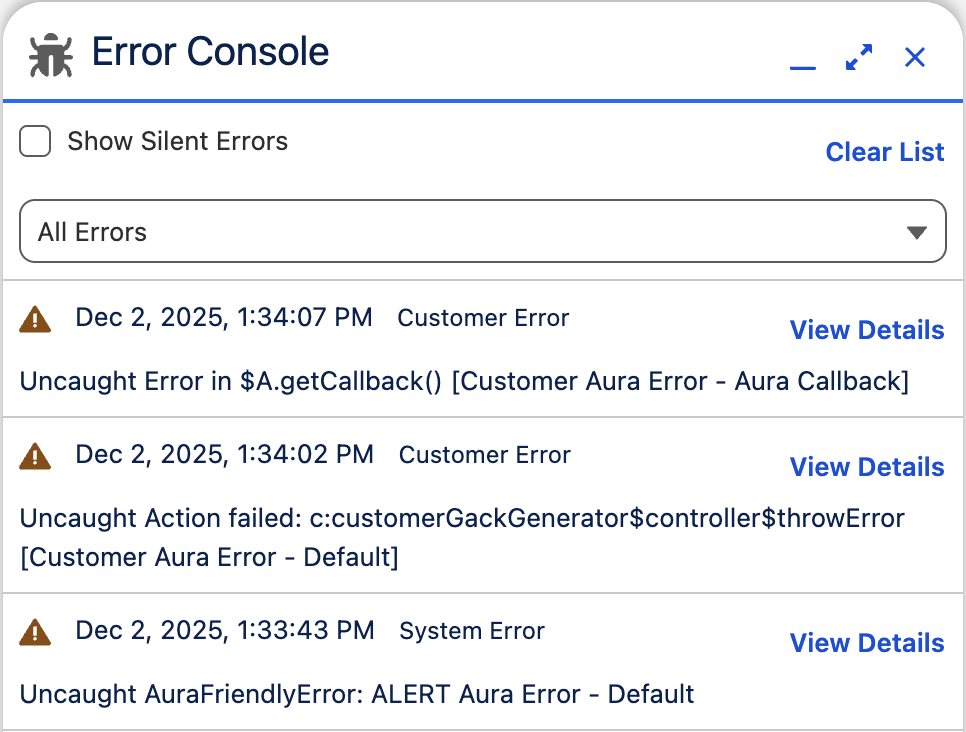
Note: Placement and permissions can vary by rollout and org setup - validate the entry point in your preview org.
Reports & Dashboards
Spring ’26 includes incremental improvements aimed at reducing repetitive admin work and user confusion. It now includes better reuse of report table settings when a report is used in dashboards; custom disclaimer text for exported reports (useful for compliance messaging); and clearer folder sharing flows, including sharing by username in some experiences. Why it matters: less rework - configure once and reuse downstream, and better governance, since exports and access control are easier to standardize.
List Views (Include in UAT)
Two changes worth flagging because they can affect “list view order = workflow” habits:
- Inline edit limits are communicated earlier - The 200-row inline edit limit is enforced/communicated sooner, reducing confusion when users try to edit large list views.
- Blank sorting behavior changes - When you sort a list view, blank fields are treated as the highest value. This can change ordering compared to previous behavior (for example, blanks may appear last in ascending sorts, and first in descending sorts).
To See It in Action: If teams rely on list view order for daily work, include list views in UAT and communicate any ordering differences.
Request Approval Component for Flow Approval Processes
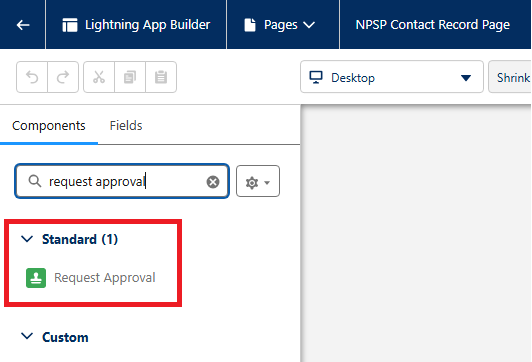
A Request Approval component lets users submit approvals directly from the record page - specifically for Flow Approval Processes (not legacy Approval Processes). It provides a cleaner UX, as approvals become record-page native, and it reinforces Flow-based approvals as the modern path forward.
To See It in Action: Build a Flow Approval Process. → Open the record page in Lightning App Builder. → Add the Request Approval component. → Test the full submit + recall experience in preview orgs.
Files Governance
Spring ’26 adds a way to let trusted users delete Salesforce Files without handing out broad admin-like permissions. This provides a stronger least-privilege posture and reduces the long-standing friction where file cleanup often required admin escalation.
To See It in Action: Go to Setup → Permission Sets (or Profiles). → Open a permission set and search permissions for Delete Salesforce Files. → Confirm what the permission actually allows in your sharing model (this is where teams get surprised). → Test with a non-admin user on: deleting a file they own; deleting a file they can access but don’t own; deleting a file shared across multiple records.
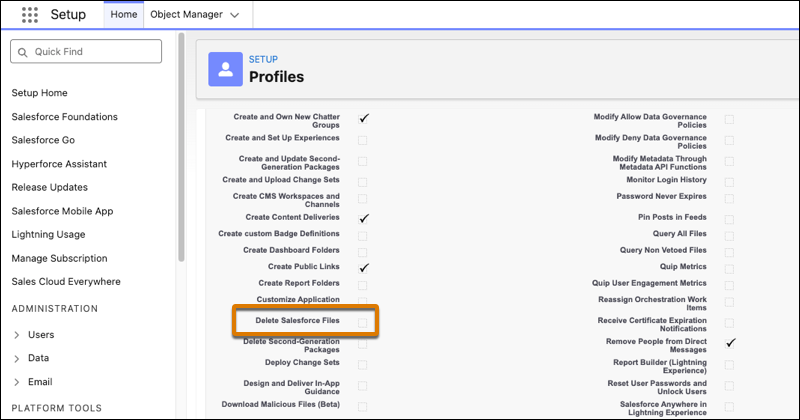
Note: Validate the real scope in your org. Depending on your visibility rules, file delete can be broader than teams expect.
Connected Apps
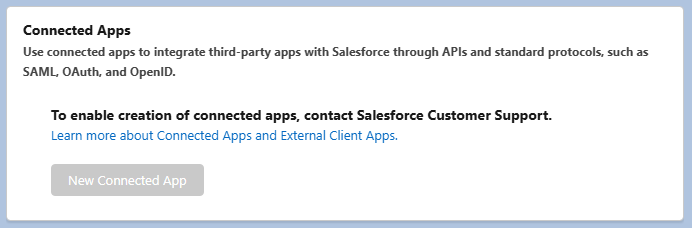
Starting in Spring ’26, customers can’t create new Connected Apps (via UI or API) unless they request the ability from Salesforce Support. This is a real governance shift. Installing packages that include Connected Apps is treated as an exception. It prevents the “someone created an OAuth client in prod” surprises and pushes orgs toward External Client Apps as the newer model.
To See It in Action: Inventory who currently creates OAuth clients and how often. → If you still need Connected Apps, plan the operational path now (including the “request from Support” reality). → Review any roadmap/migration work toward External Client Apps.
Winter ’26 screenshot (checkbox present):
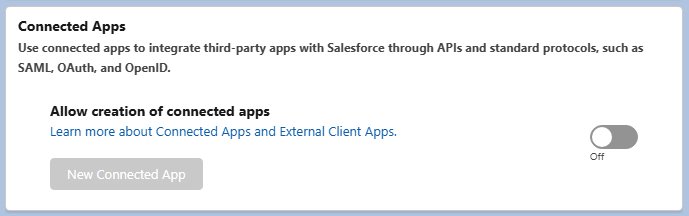
Spring ’26 screenshot (Support-required message):
New Sandbox Management Features
Sandbox Preview
For Spring ’26, Salesforce upgrades preview instances on January 9–10, 2026. Non-preview instances upgrade later (February 20–21, 2026). Sandbox creation is tied to the major release version.
Action Item: If you want at least one sandbox on preview, plan early - Full Copy queues get busy around release windows.
Faster Full Copy Creation With Quick Create (Hyperforce)
Salesforce positions Quick Create as a faster way to create/refresh Full sandboxes on Hyperforce (speedups vary by org and data volume). This reduces waiting time for UAT environments and makes it easier to align sandbox refreshes with the release timeline.
Action Item: If you’re on Hyperforce, confirm whether you already have Quick Create available and what size/eligibility limits apply in your org.
Better Visibility During Sandbox Copy
Spring ’26 also highlights improved visibility into Sandbox copy progress through UI updates. If you own Sandbox strategy and release calendars, fewer “is it stuck?” moments help planning and comms.
New Flow Features
Flow + Messaging: Enhanced Message Component
Salesforce includes an Enhanced Message Flow screen component used in enhanced Messaging sessions (Service channels). This is not a general-purpose “Info/Success/Warning/Error callout” for normal screen flows - it’s designed around messaging use cases.
Note: Don’t confuse this with a generic callout.
Action Item: If your org uses Messaging, validate whether this component helps your agent experience and what setup it requires.
Flow UX: Screen Flows Get Real Layout Control
Spring ’26 makes Screen Flows easier to design like a modern UI instead of a “stack of fields.” You can place components and record fields directly on screens (including inside section columns), then fine-tune layout with component width and vertical alignment. This enables cleaner, more intentional screens without reaching for custom LWCs just to fix spacing; more consistent experiences across flows, especially for high-traffic internal tools and guided processes; and faster iteration, since layout tweaks stay in Flow Builder instead of turning into mini dev projects.
Preview Check (Recommended): Pick one flow that users complain is “long” or “clunky” and rebuild a single screen using sections/columns plus width + vertical alignment settings. → Test across form factors: Salesforce notes these style/layout settings aren’t responsive to screen size, so validate on smaller screens and with mixed-height components. → If you plan to demo it, capture before/after screenshots and include it in UAT so stakeholders see the UX difference early.
Release Update Watchlist (don’t skip these in testing)
Enhanced Domains: Legacy Redirections End in Spring ’26
In Spring ’26, Salesforce disables redirections for legacy (non-enhanced) host names in production and demo orgs - and you can’t re-enable them afterward.
Action Item: Inventory and update old URLs in: Integrations, middleware, scripts; Templates, bookmarks, internal docs; Experience Cloud and Sites links.
Instanced URLs in API Traffic: Move Toward My Domain Login URLs
Salesforce recommends moving API traffic away from instanced URLs and testing blocking behavior via My Domain settings.
Action Item: Audit API endpoints used by integrations. → Switch to My Domain login URLs where recommended. → Use My Domain settings to test/validate before enforcement windows hit.
Visualforce Hardening: Escaping Change in <apex:inputField>
Spring ’26 includes a Visualforce hardening item around escaping the label attribute of <apex:inputField>.
Action Item: If you have older Visualforce pages with unusual label handling, validate: rendering differences; any downstream logic relying on label text/HTML.
Final Thoughts
Salesforce Spring ’26 is a release of steady improvements that reduce admin friction and make Flow experiences more polished. Focus your testing on three areas:
- Flow UX/layout improvements and anything you plan to demo
- Governance defaults, especially the Connected Apps creation lock-down and file deletion controls
- Release updates that can break URLs, redirect behavior, or legacy Visualforce assumptions
Get at least one sandbox onto preview early, run UAT with the watchlist items in mind, and only then decide what to enable and communicate broadly - especially for anything marked Beta, Pilot, or entitlement-based.