
Salesforce Summer ’26 release dates and sandbox preview
The Salesforce Summer ’26 Release is a practical platform update rather than a single headline-driven release. Admins get better visibility into permissions and field access, Flow builders get cleaner tools for maintenance and deployment, and developers need to pay close attention to the security changes in Apex API version 67.0. Below is a practical breakdown of the Summer ’26 updates worth testing before your production upgrade window.
Salesforce Summer '26 release dates are already useful for testing. The three main production release weekends are May 9, June 5, and June 12, 2026. Sandbox preview happened on the same weekend as the first production rollout (May 9, 2026), which is the standard Salesforce pattern: a small set of early-adopter production instances are upgraded on the same weekend that most sandboxes get the preview.
That means the features in this digest aren't just "coming soon" - they should already be testable in any Summer '26 preview sandbox before your production org is upgraded.
To check your org’s exact Salesforce Summer ’26 upgrade window, use Salesforce Trust Status rather than relying on a generic release calendar:
- Go to status.salesforce.com.
- Search by your My Domain, instance, or POD.
- Open the instance page and go to the Maintenance tab.
- Filter for Major Release and look for Summer ’26.
If you do not know your instance, go to Setup → Company Information in Salesforce. Salesforce also maintains official sandbox preview instructions, which are useful when planning refreshes around the release window.
Salesforce Summer ’26 admin and platform updates
Permission dependencies are finally visible before you save
Salesforce is demystifying permission changes. Salesforce now displays a modal with the related permission changes that are required to maintain consistency when you change user permissions, object permissions, or assigned apps in a profile.
That sounds little, but it counts. Rarely are permissions simple in real orgs. And related changes that were once easy to overlook until someone checked Setup Audit Trail later can come with a profile change. Admins now get a better preview before the change is saved, which should mean fewer surprises and easier troubleshooting.
Why this matters: permission work becomes easier to explain, audit, and support, especially in orgs with layered profiles, permission sets, permission set groups, and inherited access.
Field Access gives admins a single place to review field-level security
One of the updates that admins will use all the time, once it’s part of their routine, is the new Field Access view in Object Manager. You can see what profiles, permission sets, and permission set groups grant you read or edit access for a selected field.
"Who can actually see this field?" – In the past, this question was often answered by opening several profiles and permission sets, one by one. Now the information is compressed.
This view is read-only. It is not intended for direct editing access but for investigation and auditing. You still make changes on the relevant Profile, Permission Set, or Permission Set Group page.

Where to find it:
Setup → Object Manager → select an object → Field Access → choose the field
Queue sharing gets more precise
The new "Grant Access Using Hierarchies" setting for queues allows you to control whether records shared with a queue are also accessible to users higher up in the role hierarchy. Previously, such access was granted by default, which could be useful but sometimes led to unnecessary visibility and extra notifications. This setting gives you more precise control over who can see the records shared with a queue, helping to reduce unwanted access and notifications.
The defaults are important:
- Existing queues keep the current behavior: the setting is enabled.
- New queues created in Summer ’26 have the setting disabled by default.
- Admins can control the default for new queues from Sharing Settings.
Where to find it:
Setup → Queues → create or edit a queue → Grant Access Using Hierarchies
Shared list views get more sensible permissions
Salesforce is enhancing list view governance with new setup options that improve control and collaboration. Now, users with the appropriate list view permissions can edit shared list views, making it easier to keep views relevant and up to date.
More significantly, the introduction of the "Manage Shared List Views" permission allows users to share their personal list views with roles, groups, or territories they belong to without granting them the broader "Manage Public List Views" permission. This distinction helps maintain better security and responsibility boundaries.
In essence, the ability to share a useful view with your team no longer requires the elevated permissions needed to edit or delete public list views across the entire organization. This separation of duties is a welcome improvement for maintaining governance and minimizing risks.
Why this matters: teams get more flexibility without over-permissioning users.
Chatter is off by default in new orgs
Chatter is turned off by default in Salesforce orgs created in Summer ’26 and later. Existing orgs are unaffected.
Admins can still turn it on in Setup if your org uses Chatter for Case Feed, Experience Cloud, APIs, or other Chatter-dependent functionality. This change aligns with the general direction Salesforce has been taking with Slack-powered collaboration: Salesforce channels in Slack are available by default in new Enterprise and Unlimited orgs.
Practical takeaway: for new implementations, do not assume Chatter is on. Check early if your design depends on it.
Malware scanning for Salesforce Files is generally available
Now generally available: File malware scanning. Admins can enable scanning on a dedicated Malware Scanning page in Setup and configure notifications for flagged files.
In addition to operational improvements, Salesforce now allows the Manage Malicious Files permission to be assigned to standard users, so security or compliance teams can review flagged uploads without needing full admin access.
Where to find it:
Setup → Malware Scanning → enable file scanning and configure notifications
Salesforce My Trust Center is generally available
Salesforce My Trust Center is now generally available, providing customers with a more personalized view of incidents, major releases, patch releases, and maintenance events for their Salesforce products and tenants.
The page includes color-coded event types and localized date/time formatting. Users can subscribe to receive patch release notifications for chosen products.
Where to start:
Go to trust.salesforce.com or status.salesforce.com, then log in with a Trailblazer account.
Salesforce Summer ’26 reports and dashboards updates
Brand color palettes are now available for reports and dashboards

Admins now have the ability to apply an organization's brand color palette to reports and dashboards. Instead of picking colors chart by chart, you set your palette once in Themes and Branding and then reuse it in analytics assets.
This isn’t mere cosmetics. Consistent color usage makes dashboards easier to scan, easier to explain, and more consistent with internal presentation standards.
Where to place it:
Setup → Themes and Branding → create or update a theme → add your brand colors → activate the theme.
Then choose the brand palette from the dashboard properties or report chart properties.
Reports can now use two row-level formulas
Reports now support up to 2 row-level formulas. Previously, you had one. That limitation often forced admins to choose between two useful calculations or create extra formula fields on the object just to support reporting.
With two row-level formulas, reporting becomes more flexible without adding unnecessary fields to the data model.
Examples:
- Commission amount and commission rate
- Days to close and margin percentage
- SLA age and priority score
Where to find it:
Open a report, go to the Outline panel, and add a row-level formula from the Columns area.
Custom LWCs can be embedded in Lightning dashboards
Embed custom Lightning web components directly in Lightning dashboards. This provides teams with a supported way to add more advanced or interactive data experiences into dashboards without having to build separate Visualforce pages, custom tabs, or Experience Cloud pages just for reporting.
Consider use cases like custom drill-downs, specialized visualizations, real-time operational views, or a chart type that standard dashboard components do not support.
Why this matters: advanced reporting experiences can live where users already go for analytics.
Excel exports are safer by default
Salesforce is extending formula-injection protection to Excel exports. If exported values begin with characters that spreadsheet programs might interpret as formulas, Salesforce adds a leading apostrophe so the value is treated as text.
This is especially useful for exported reports containing IDs, phone numbers, external references, or values that can start with characters such as =, +, or -.
Why this matters: It reduces the risk of spreadsheet formula execution and helps preserve exported values exactly as data.
Salesforce Summer ’26 Flow and automation updates
Decision elements get better Date operators
Flow Decision elements now include more Date operators, such as Is Today, Is Tomorrow, and anniversary-style comparisons that disregard the year.
This clears out a lot of formula-resource clutter. Builders no longer have to work around routing records based on “today”, “tomorrow”, or recurring date logic. Important note: this is an enhancement for the Date datatype. This does not work for DateTime fields.
To see it in action: open a Flow, add or edit a Decision element, choose a Date resource or Date field, and review the expanded operator list.
Email template references survive deployments more reliably
A long-standing Flow deployment pain point is being addressed. When a Flow Send Email action references an Email Template, the newer action version stores the template reference by metadata identity instead of relying on an environment-specific record ID.
That matters because Email Template record IDs differ between sandboxes and production. Previously, teams often had to reselect templates after deployment. With the updated behavior, template references are much less likely to break during promotion.
To see it in action: open the Flow, select the Send Email action, update it to the newer action version, and select the email template by name rather than relying on an environment-specific ID.
Screen Flow data tables can show related record names
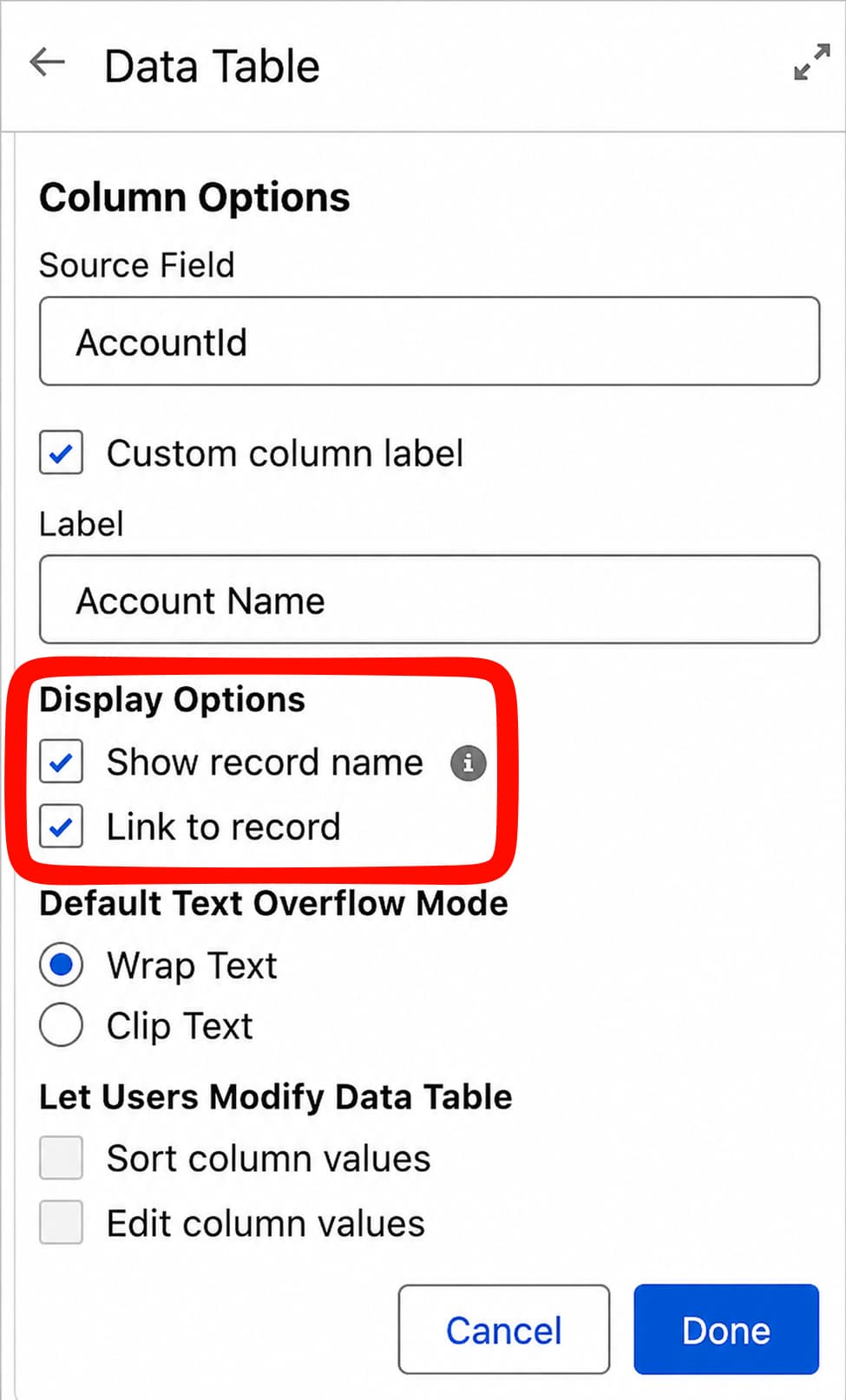
Lookup fields in the Screen Flow Data Table component can now show the related record’s name instead of only showing a Salesforce ID. Builders can also make that name a hyperlink to open the related record. This makes Data Tables feel much closer to standard Salesforce UI behavior and removes the need for formula or URL workarounds.
Why this matters: Screen Flows become more useful for guided record review, lightweight service processes, and controlled alternatives to related lists.
To see it in action: edit a Screen Flow with a Data Table component, open the Lookup column configuration, and enable the option to display the related record name and link to the record.
Radio Button Group improves Screen Flow layout

The new Radio Button Group component gives builders a more compact way to present single-select choices in Screen Flows. On desktop, choices can be arranged horizontally; on mobile, they can stack vertically.
It works like traditional radio buttons, but the layout is more space-efficient and easier to scan.
To see it in action: edit a Screen Flow, drag a Radio Button Group onto the screen, and configure the choices the same way you would for a standard single-select input.
Fault paths can be collapsed in Flow Builder
Flow Builder now lets you collapse fault paths on the canvas. If your org uses shared error-handling subflows, this is a practical quality-of-life improvement.
The underlying Flow logic does not change. The canvas simply becomes easier to read, especially in larger Flows where every element has an error path.
To see it in action: open a Flow with a fault path and use the collapse control on the fault branch to hide the error-handling path from the main canvas view.
Scheduled Flows get batching controls
Scheduled Flows can now use a configured batch size. This helps control how many records the Flow processes in a batch run.
That is useful when the number of matching records suddenly grows. A Scheduled Flow that normally processes hundreds of records might unexpectedly hit thousands. Batching gives builders a better way to keep performance predictable and reduce exposure to limits.
To see it in action: edit a Scheduled Flow, open the Start element, and set the Batch Size value based on how many records you want the Flow to process per batch.
Flow health is easier to triage from the list view
The Flows list view now includes an Element Error Rate column. It shows the percentage of Flow elements that produced errors in the Flow’s most recent run.
For orgs with many active Flows, this is a meaningful monitoring improvement. Instead of opening Flow after Flow to see what is failing, admins can spot likely problem areas directly from the list.
To see it in action: go to Setup → Flows and review the Element Error Rate column. For deeper troubleshooting, add Element Errors and Element Runs to the list view.
Group approval steps can require unanimous approval
Flow Approval Processes now support a Require unanimous approval option for steps assigned to groups.
When the step starts, Salesforce creates an approval work item for every group member. The step moves forward only if every member approves. If one member rejects, the step is rejected.
The main caveat: approval work items for unanimous approval steps cannot be reassigned, so group membership needs to be correct before the approval starts.
To see it in action: in a Flow Approval Process, edit a step assigned to a group and enable Require unanimous approval.
Approvals come to Slack
Flow Approval Processes and Advanced Approvals can now be acted on in Slack. Approvers can approve, reject, and add comments without leaving Slack, while Salesforce keeps the approval history visible for audit purposes.
This is a useful change for teams that already work heavily in Slack. Approvals often slow down because people do not see them in time. Moving the decision into the place where people already work should reduce that friction.
To see it in action: connect Salesforce and Slack, make sure approvers and submitters have the required approval-object access, then test approving, rejecting, and commenting from Slack while checking the Approval Trace in Salesforce.
Flow Orchestration is now a standard feature
Flow Orchestration runs are now included in supported editions without usage-based limits. This change became effective earlier in 2026, but it is worth repeating because it changes the business case for teams that previously avoided Flow Orchestration due to run entitlements.
If you ruled it out before, it may be time to look again.
Agentforce and AI updates in Salesforce Summer ’26
Multi-agent orchestration is in beta
Agentforce can now orchestrate work across specialized agents in the same org. From the user’s point of view, there is one point of contact. Behind the scenes, the primary agent can delegate parts of the work to other agents.
This is a beta capability, so it should be treated carefully. It is promising, but not something to drop into a production-critical workflow without sandbox testing and governance.
Practical guidance: use it to explore agent design patterns, not as an excuse to remove human review from important processes too early.
Agentforce for Flow is back in beta, including Screen Flow updates
Salesforce has moved Agentforce for Flow capabilities back to beta while improving accuracy and reliability. The Screen Flow enhancement is still valuable: builders can describe changes in natural language and review the generated updates in Flow Builder.
But the beta status matters. Teams should treat generated changes as a draft, not as a final implementation. Review the logic, test the Flow, and keep normal deployment controls in place.
To use these capabilities, admins must opt in from Process Automation Settings by enabling Agentforce flow automation (Beta).
Important correction: the previously announced ability to create and use Agentforce agents directly in Flow Builder was removed from the Summer ’26 release notes because Salesforce said the feature was not ready yet. It should not be included as an available Summer ’26 feature.
Salesforce Summer ’26 developer updates: Apex, LWC, and Web Console
Apex API version 67.0 changes security defaults
API version 67.0 is one of the most important technical changes in the release. Apex database operations now run in user mode by default, not system mode. That means SOQL, SOSL, DML, and Database methods enforce the running user’s sharing rules, field-level security, and object permissions unless the code explicitly opts into system mode.
This is a good direction for platform security, but it can change behavior when existing code is upgraded to v67.0.
Before changing API versions, review code that expects to see records or fields the current user cannot access. Those queries may return fewer rows or fail where they previously worked.
Other related Apex changes in v67.0 include:
- Apex classes without an explicit sharing declaration default to with sharing.
- WITH SECURITY_ENFORCED is removed for API version 67.0 and later; use explicit user-mode access instead.
- Apex triggers always run in system mode and cannot declare explicit sharing or access modes.
Recommended action: Set access mode intentionally. Do not rely on defaults for security-sensitive code.
Apex gets multiline strings and String.template()
Apex now supports multiline strings and a new String.template() method for interpolation.
This will make large text blocks much easier to write and maintain: email bodies, JSON payloads, debug messages, HTTP request bodies, and generated text should all become cleaner.
It is a developer quality-of-life update, but one that can reduce real maintenance pain.
Local Dev becomes Live Preview
The LWC local development experience has been renamed Live Preview, and the single-component preview is generally available.
Developers can preview an individual Lightning Web Component in a browser or directly in Visual Studio Code without reloading a full Lightning page. For component-heavy teams, this shortens the feedback loop and makes UI development less tedious.
LWC State Managers are generally available
LWC State Managers are now generally available. They let developers separate state and related logic from the component UI itself.
For simple components, this may not matter much. For complex applications with multiple synchronized components, it can make the architecture easier to reason about and easier to test.
Web Console is in beta
Salesforce is introducing Web Console, a browser-based IDE embedded in Salesforce. It supports Apex development, SOQL query building, debug log configuration, trace flags, and anonymous Apex execution.
It opens automatically from Apex Classes, Apex Triggers, or Apex Jobs in Setup.
Because Web Console is beta, it should be evaluated carefully before teams make it part of standard delivery workflows. Still, it is a useful step toward making basic Apex work possible without local setup.
Salesforce Release Manager is in beta
Salesforce Release Manager gives teams a way to preview and test upcoming features through a Dev channel in sandboxes before those features appear in the standard release cycle.
For teams with strict change-management processes, this could become useful for earlier validation of platform changes.
Salesforce Summer ’26 Nonprofit and Service Cloud highlights
Nonprofit Cloud is now Agentforce Nonprofit
Salesforce is renaming Nonprofit Cloud to Agentforce Nonprofit. In this release, the change is mostly branding: the product, data model, and packaging remain unchanged. For a broader implementation context, Maintask also has a dedicated Salesforce Nonprofit Cloud overview.
Nonprofit teams should still pay attention because the name will appear more often across Salesforce documentation, Setup, and AppExchange over time.
Practical nonprofit updates include:
- The ability to pause selected Gift validation rules during migration.
- A Donor Support Agent (Beta) for common donor self-service requests, available the week of June 5, 2026.
- A simplified setup hub through Salesforce Go.
- A more sustainable tax-status search integration for Grants Management.
The migration-related validation controls are especially useful, but they should be used carefully and only during controlled data migration windows.
Service teams should watch Agentic Milestones and SLA risk scoring
Two Service updates stand out for support-heavy orgs. If your team is evaluating service operations more broadly, you can also review Maintask’s Salesforce Service Cloud page for related implementation context.
Agentic Milestones is in beta and uses generative AI to help complete routine SLA-related communications, such as first responses or milestone updates. Because it is beta and involves customer communication, it should be tested carefully before broad rollout.
Proactive Risk Scoring adds a risk score to case records based on real-time data such as priority, status, and recent activity. The goal is to help teams identify cases that are likely to breach SLA before they actually do.
For service leaders, this is the more immediately practical update: it gives reps and managers another signal for prioritizing work.
Salesforce Summer ’26 Release Updates and retirements to test before production
The most important Salesforce Summer ’26 Release work may not be adopting new features. It may be making sure enforced Release Updates and retirements do not surprise your org.
Go to Setup → Release Updates and review the items available for your org. Salesforce’s own Manage Release Updates documentation is a good reference for how to review impact, start available test runs, and track enforcement status. Then test in a sandbox before production is upgraded.
Migrate to a multiple-configuration SAML framework
If your org still uses Salesforce’s older single-configuration SAML framework for SSO, migrate to the multiple-configuration framework before enforcement.
This update has been postponed before, but Summer ’26 is the enforcement point in the release notes. Treat it as a real deadline.
Salesforce-managed X authentication provider retirement
The Salesforce-managed app for the X, formerly Twitter, authentication provider, is being retired.
If an Auth Provider uses Type = Twitter and has a blank Consumer Key, it may depend on the Salesforce-managed app. To keep it working, create your own X app in the X Developer Portal and update the Consumer Key and Secret in Salesforce.
Blob.toPdf() uses the Visualforce PDF rendering service
Apex Blob.toPdf() now uses the same rendering service as Visualforce. This brings improvements such as a broader font and multibyte character support, but output can change.
If your org generates customer-facing PDFs, invoices, receipts, statements, contracts, certificates, test them visually before enforcement. For teams that generate documents from Salesforce records, our guide to Salesforce document generation may also be useful when reviewing how PDF output fits into business workflows.
Recommended test approach:
- Identify Apex code using Blob.toPdf().
- Generate baseline PDFs in a sandbox.
- Enable the update or test-run option where available.
- Regenerate the PDFs.
- Compare layout, fonts, spacing, line breaks, and page breaks.
Apex batch action results are sorted by request order
Apex batch action results are now returned in the order the requests were received. If any integration or downstream logic depended on the previous ordering behavior, it’s important to validate this in a sandbox environment. Changes like this may seem minor, but downstream processes might incorrectly assume that the first result is the most important, which can cause issues.
Instanced URLs in API traffic are postponed, but should not be ignored
The Release Update for instanced URLs in API traffic has been postponed to Winter ’27. That gives teams more time, but it does not remove the work.
Start auditing hardcoded instance URLs such as na123.salesforce.com in integrations, Apex, middleware, and Visualforce. Move to My Domain URLs wherever possible.
Accessibility Release Updates deserve testing at high zoom
Several accessibility-related Release Updates affect how Salesforce UI elements behave at high browser zoom levels. Test important Lightning pages, custom pages, Visualforce pages, modal-heavy workflows, and utility-bar-heavy layouts at 200% zoom and higher.
This is especially important if your users rely on browser zoom or assistive technology as part of their normal work.
Standard Omni-Channel is being retired
Standard Omni-Channel is scheduled for full retirement on June 1, 2026. Salesforce automatically upgrades most affected orgs to Enhanced Omni-Channel during the Summer '26 rollout, but the automatic upgrade has exceptions. Orgs with a legacy-chat exemption or that haven't agreed to Hyperforce AWS terms may not be auto-upgraded.
The risk if you don't migrate in time: after June 1, 2026, users in non-upgraded orgs won't be able to log in to Omni-Channel, and work items won't be routed. This directly impacts service operations.
Action: If your org still uses Standard Omni-Channel, verify your status well before June 1. In Setup → Omni-Channel Settings, enable Enhanced Omni-Channel Routing in a sandbox first, test routing behavior, and migrate production before the deadline. Note that you must first upgrade standard service channels (Chat/Live Agent, standard SMS, Facebook Messenger) to enhanced before turning on Enhanced Omni-Channel; otherwise, the standard channels will stop working.
Salesforce to Salesforce support is discontinued in Summer ’26
Salesforce to Salesforce is being retired in three phases:
- Spring ’26: You can no longer turn on Salesforce to Salesforce in any org. Orgs that already had it enabled continue to function.
- Summer ’26: Support for Salesforce to Salesforce is discontinued in this release. The product still functions, but Salesforce no longer provides support.
- Spring ’27: Salesforce to Salesforce is fully retired in all orgs and no longer functions.
If your org still uses Salesforce to Salesforce, plan migration paths to supported alternatives such as Partner Cloud, Data Cloud One, MuleSoft Anypoint, or MuleSoft for Flow before Spring ’27.
Future Salesforce release changes to plan for now
A few upcoming changes are not the main Summer ’26 fire drill, but they are worth planning for now.
Enable Profile Filtering
This Release Update is available starting in Summer ’26 and is scheduled for enforcement in Winter ’27. It limits users from viewing profile names other than their own unless they have the View All Profiles permission.
If any support, admin, reporting, or operational process depends on users seeing profile names, review it before enforcement.
Adopt Authorized Email Domains
If your org previously worked with Salesforce Support to disable email-change verifications, plan to configure Authorized Email Domains. Salesforce is moving away from the older exemption process.
OAuth 2.0 username-password flow retirement
The OAuth 2.0 username-password flow for connected apps is scheduled for retirement in Winter ’27. Integrations using it should move to more appropriate OAuth flows, such as web-server or client credentials flows.
Salesforce for Outlook retires in December 2027
Salesforce for Outlook is scheduled for retirement in December 2027. When retired, it will no longer sync contacts, events, or tasks, and the side panel will no longer be available.
The migration path is Outlook Integration with Einstein Activity Capture.
Final thoughts: what to prioritize in Salesforce Summer ’26
In the best way, Summer ’26 is a maintenance-and-maturity release. It eliminates friction in places admins run into weekly: permissions, field access review, list view sharing, Flow monitoring, dashboard customization, and deployment-safe email template references.
The AI updates are important, but they should be taken with the right level of caution.” Multi agent orchestration and Agentforce for Flow are clear indicators of the direction Salesforce is heading. But beta status means teams should test thoroughly and keep review steps in place.
Developers: The item you don’t want to skim is API version 67.0. This is good for security, as it moves to user-mode defaults and enforces stronger sharing, but can impact existing behavior when the code is upgraded.
And for release owners the priority list is simple: SAML, X Auth Providers, Blob.toPdf(), Apex batch action result ordering, accessibility, and Standard Omni-Channel. These are the items most likely to create production surprises if they are ignored.
Today, the Agentforce Nonprofit rename for nonprofit teams is mostly cosmetic, but updates around Fundraising migrations, setup, and donor self-service are worth a look.
The best way is not to do everything at once. Pick the low risk productivity wins, test the enforced updates and pay extra attention to anything that touches authentication, PDF generation, routing or Apex security behavior.
If your team wants release monitoring, regression testing, admin support, or help deciding which Summer ’26 changes are worth adopting, Maintask’s Salesforce Support+ is built around ongoing Salesforce maintenance, release readiness, regression testing, and admin support.
Preparing for the next upgrade after Summer ’26? See our Winter ’27 guide for nonprofit admins for rollout dates, integration changes, and the testing checklist.
Salesforce Summer ’26 FAQ
When is the Salesforce Summer ’26 Release?
The Summer '26 production rollout is scheduled across three weekends: May 9, June 5, and June 12, 2026. Your exact upgrade window depends on your Salesforce instance, so check the Maintenance tab on Salesforce Status.
When did the Salesforce Summer ’26 sandbox preview start?
Summer ’26 preview sandboxes were upgraded on May 9, 2026. If your sandbox is on the preview track, you can already test many Summer ’26 features before production rollout.
What are the most important Salesforce Summer ’26 updates for admins?
Admins should pay close attention to Field Access in Object Manager, permission dependency visibility, queue sharing controls, shared list view permissions, malware scanning for Salesforce Files, and enforced Release Updates.
What are the biggest Salesforce Summer ’26 Flow updates?
The most practical Flow updates include Date operators in Decision logic, more reliable Email Template references after deployment, related-record links in Screen Flow Data Tables, Radio Button Group, collapsible fault paths, Scheduled Flow batching, Element Error Rate monitoring, unanimous approvals, and Slack approvals.
What should developers review before moving Apex to API version 67.0?
Developers should review code that depends on system-mode behavior. In API version 67.0, Apex database operations run in user mode by default, Apex classes enforce sharing by default, WITH SECURITY_ENFORCED is removed, and triggers always run in system mode.
What should be tested before the Summer ’26 production upgrade?
Prioritize SAML migration, X Auth Provider configurations, Blob.toPdf() output, Apex batch action result ordering, accessibility behavior at high zoom, Standard Omni-Channel upgrade behavior, and any Apex code being moved to API version 67.0.





.png)

.png)


